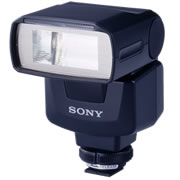
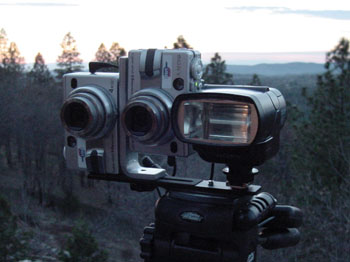
To ensure success right off, follow these steps. Later, when you are comfortable with the flash and LANC Shepherd, change the settings for more advanced control.
The HVL-F1000 powers up when the cameras power up, does its own flash intensity calculation, and responds to the camera's flash settings. It has a wide "beam", particularly with the diffuser down, and covers the wide angle field of view of the Sony DSC-V1 camera well. This flash really is a pleasure to use and works well with the LANC Shepherd. Shutter lag with this flash is virtually zero, faster by a good bit than with the standard internal TTL flash.
1. Connect the cables: Connect the master LANC Shepherd cable to the "ACC" port on the side of the flash body, attach the flash cable between the flash and master camera, and connect the other LANC Shepherd cable to the slave camera. If you are using the bar and cold shoe that came with the flash, note that the cold shoe can be rotated on the bar, allowing you to mount the flash on either side of the cameras.
2. Power up procedure: Turn cameras' rotary mode switch to "playback" mode (triangle icon). Power up cameras using the LANC Shepherd until satisfactory sync achieved (from "S 0.20" to "M 0.50" with camera master/slave selected so that sync drifts from S toward M). Having the cameras in playback mode improves the probability of sync, and makes syncing much faster. Turn cameras' rotary mode selector to automatic (camera icon). Select the "force flash" mode on the cameras. The flash will respond to the cameras' need for flash, but for now force "flash on" for demonstration purposes.
3. Power up the flash: The F1000 is completely automatic, so you can just leave the flash power switch on, and the flash will power up and down with the cameras automatically. The flash power switch setting will not interfere with the camera power-up sync as it does with the HVL-F32X.
4. Achieve AES Lock: With camera and flash on subject, press and hold the LANC Shepherd shutter button half way down until AES lock is achieved (green dots stop blinking and become steady on both camera LCD displays). The time to achieve lock varies quite a bit, but the cameras will not fire in sync with flash until the lock is achieved.
5. Take an exposure: Press the LANC Shepherd shutter button all the way down to take an exposure. To take additional exposures, just achieve AES lock again, and shoot. As the shutter speed is slow in low light, the sync can drift out quite a bit before a re-sync is needed (can drift out to about 1/4 to 1/2 the shutter speed).
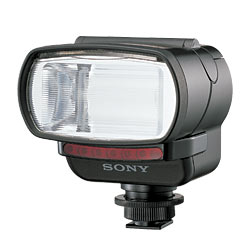
This flash has substantial power, much like the HVL-F1000, but photos seem to have better blending of ambient and flash illumination. However, the F32X is more difficult to use as it needs to be off for the the cameras to sync on power-up, and it seems to have a more narrow field of illumination (though it can be angled for bounce). The HVL-F32X flash has two automatic modes and a manual mode. Mode "Auto A" is TTL (through the lens) metered, and depends on a pre-flash and data communication between the cameras and the flash. While this mode works well to achieve consistent exposure, it produces a substantial shutter lag, and probably is best used for still life and studio work. Mode "Auto B" is standard automatic, and works just the same as the fully automatic HVL-F1000 with virtually no shutter lag. Mode Manual provides a manual adjustment of flash intensity.
1. Connect the cables: Connect the master LANC Shepherd cable to the flash cable "Y" port, attach the flash cable between flash and master camera, and connect the other LANC Shepherd cable to the slave camera. If the cameras have a "smart shoe" with contacts, you must either cover the camera contacts with a spot of tape before sliding in the F32X, or mount the F32X on a cold shoe. Competition between the "ACC" port and "smart shoe" LANC ports will make camera power-up sync poor. If you are using the bar and cold shoe that came with the flash, note that the cold shoe can be rotated on the bar, allowing you to mount the flash on either side of the cameras.
2. Power up procedure: Flash turned off. Turn cameras' rotary mode switch to "playback" mode (triangle icon). Power up cameras using LANC Shepherd until satisfactory sync achieved (from "S 0.20" to "M 0.50" with camera master/slave selected so that sync drifts from S toward M). Having the cameras in playback mode improves the probability of sync, and makes syncing much faster. Turn cameras' rotary mode selector to automatic (little camera icon). Select the "force flash" mode on the cameras. The flash will respond to the cameras' need for flash, but for now force "flash on" for demonstration purposes.
3. Turn on the flash, and select flash mode: If the flash is on, it seems to interfere with the camera power up sync, so have it off while powering up the cameras.
4. Achieve AES Lock: With camera and flash on subject, press and hold the LANC Shepherd shutter button half way down until AES lock is achieved (green dots stop blinking and become steady on both camera LCD displays). The time to achieve lock varies quite a bit, but the cameras will not fire in sync with flash until the lock is achieved.
5. Take an exposure: Press the LANC Shepherd shutter button all the way down to take an exposure. To take additional exposures, just achieve AES lock again, and shoot. As the shutter speed is slow in low light, the sync can drift out quite a bit before a re-sync is needed (can drift out to about 1/4 to 1/2 the shutter speed, but does not seem to work beyond "M 0.80ms").
Good luck,
Rob Crockett
Copyright © 2008. All Rights Reserved.
Back to LANC Shepherd User Manual page
Back to LANC Shepherd page
Digital Stereo Photography Home